


© Copyright PETRONAS Dagangan Berhad 198201008499 (88222-D).
All rights reserved.
-
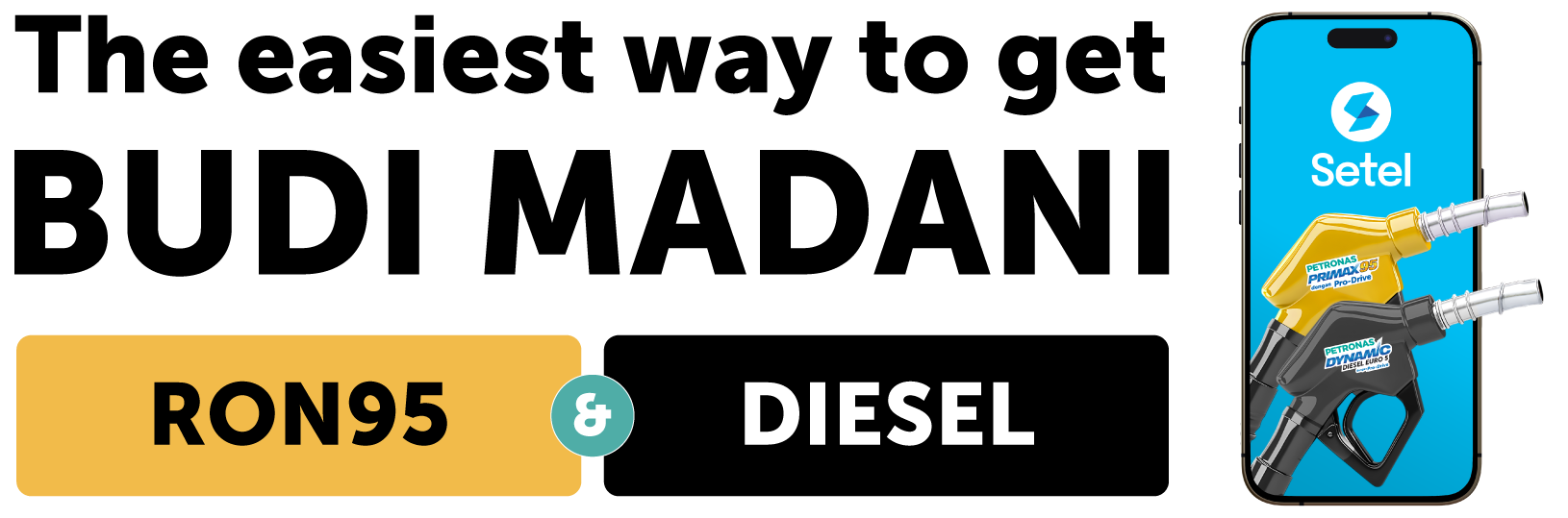
Setel is the easiest way to enjoy BUDI MADANI RON95 & DIESEL with no complicated steps or long waits. Verify your MyKad once and refuel without it after. You can also check your BUDI MADANI RON95 & DIESEL eligibility and balance while enjoying full cashless and cardless convenience. Plus, you’ll continue to earn Mesra Rewards points, track your spending, and manage all your fuelling needs in one app.
Just follow the steps below
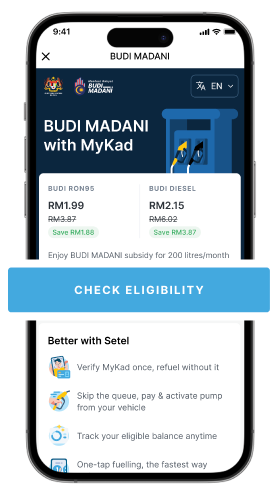
Check your eligibility
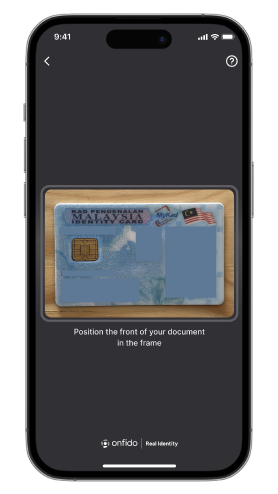
Verify your
MyKad
(one-time only)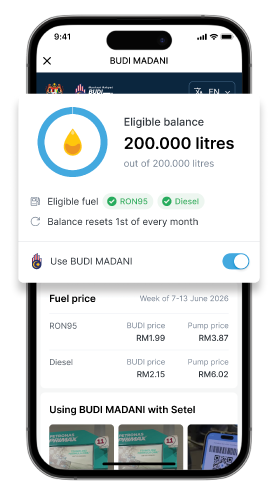
Check your
quota balance
anytime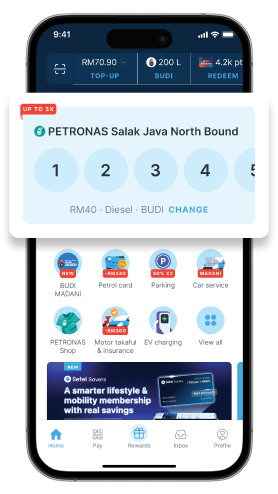
Faster with
One-tap FuellingOther ways to enjoyBUDI MADANI RON95 & DIESELChoose a payment method below to learn more.- At the pump
- Step into Kedai Mesra
- Via Setel Lite
- via Touch n Go eWallet
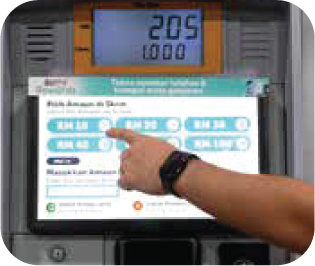 STEP 1Select amount & make payment.
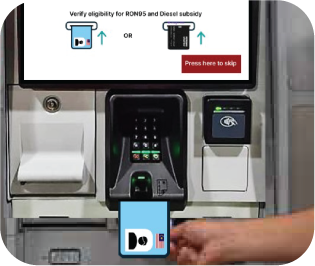 STEP 2Insert MyKad to check eligibility.
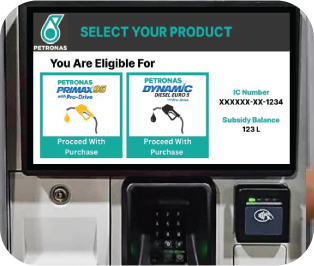 STEP 3If eligible, please choose your product (RON95 or Diesel).If not eligible, the purchase will be made at the normal price.
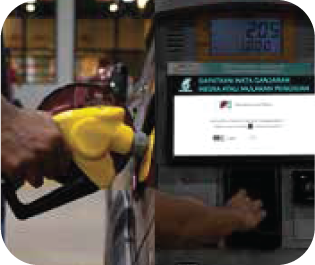 STEP 4Lift the nozzle and start fuelling.Want more value? Enter your phone number to collect Mesra Rewards points.
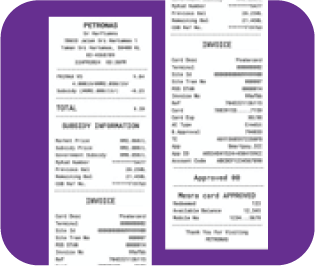 STEP 5Receive the final receipt after fuelling for BUDI MADANI RON95 or Diesel payment details.
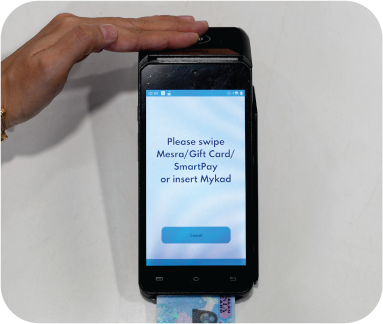 STEP 1Insert MyKad for BUDI MADANI RON95 or Diesel to check eligibility.
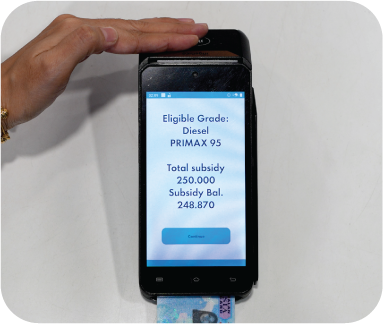 STEP 2Once verification is confirmed, proceed with your purchase.
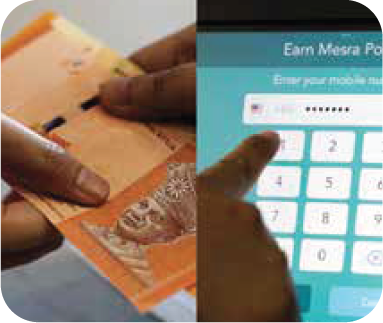 STEP 3Inform cashier your preferred product (RON95 or Diesel) & make payment.Want more value? Enter your phone number to collect Mesra Rewards points.
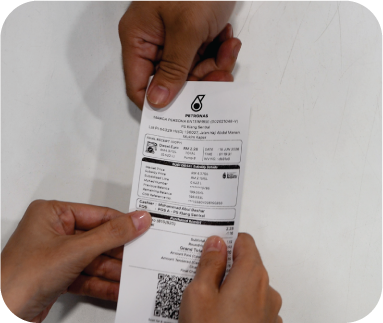 STEP 4Receive the final receipt & fuelling RON95 or Diesel.
Check Eligibility
(one-time only)- Tap BUDI MADANI.
- Tap Check Eligibility.
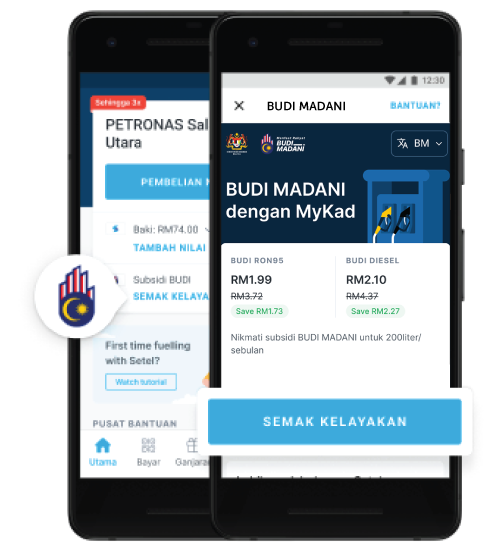
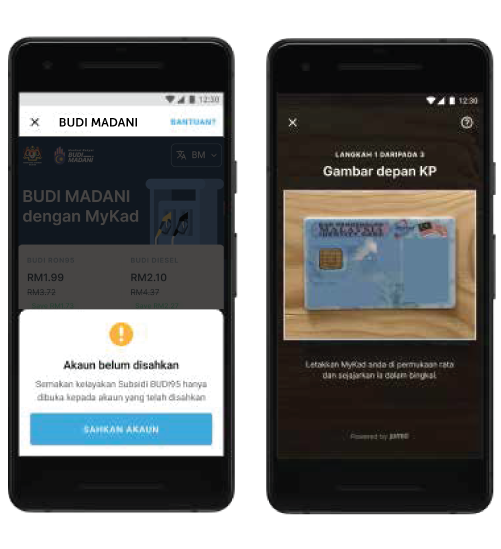
Verify your account – eKYC
- Tap Check Eligibility.
- Tap Verify Eligibility.
- Take a photo of your MyKad.
- Take a selfie.
- Complete additional details.
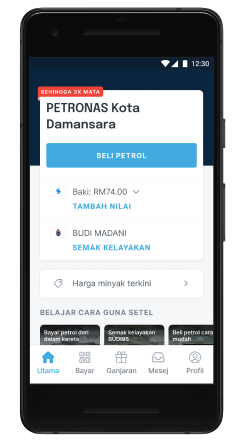 STEP 1Tap Fuel Purchase.
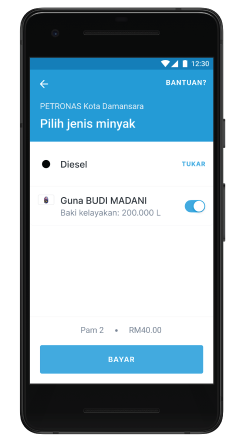 STEP 2Select pump, amount and activate BUDI MADANI.
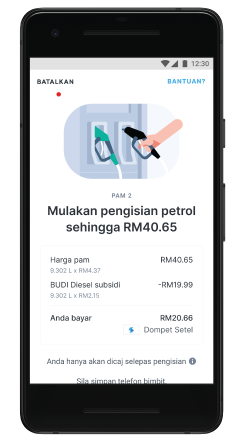 STEP 3View fuel received and amount paid.
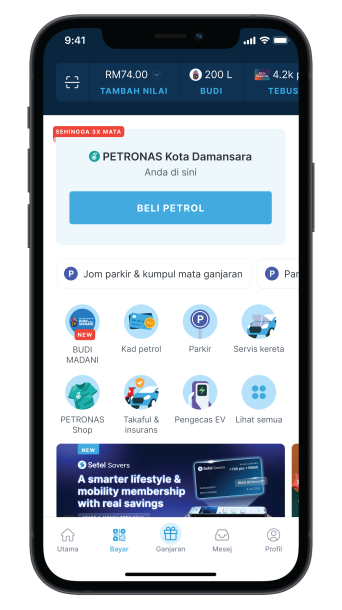 STEP 1Tap Pay & inform cashier.
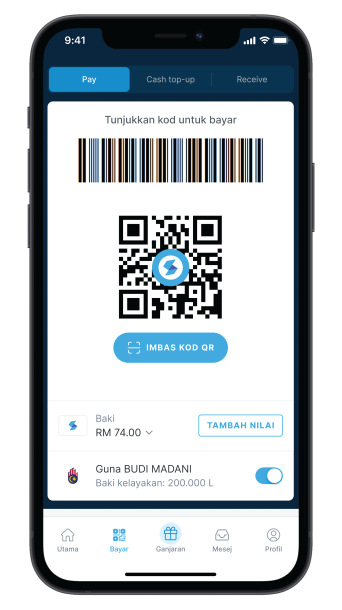 STEP 2Show barcode to cashier.
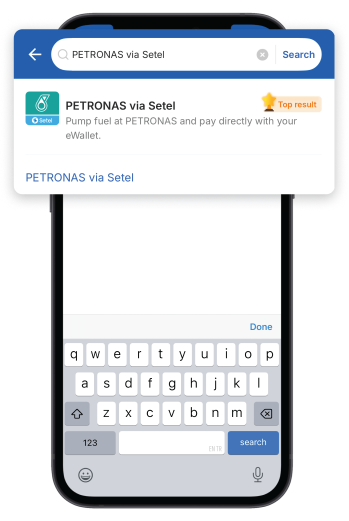 STEP 1Find PETRONAS via Setel.
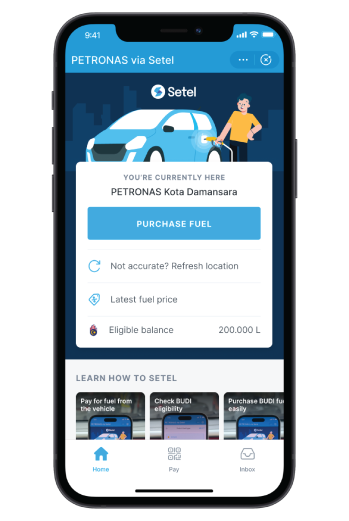 STEP 2Tap Purchase Fuel.
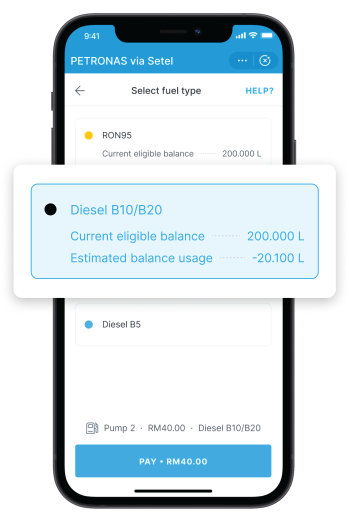 STEP 3Select pump, amount, fuel product.
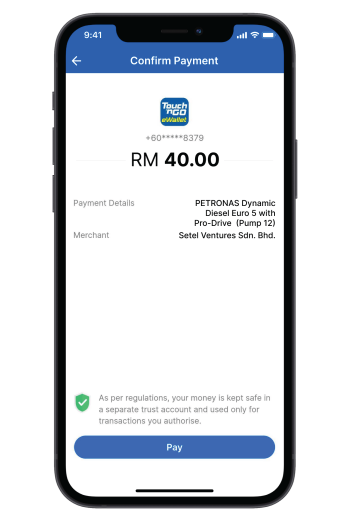 STEP 4Pay with TNG eWallet.
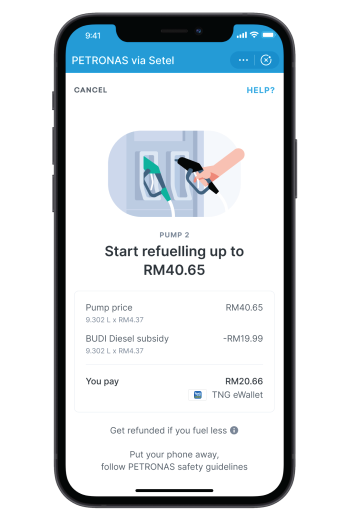 STEP 5View fuel amount & payment.
Frequently Asked Questions
The implementation of the BUDI95 programme will be carried out in stages:
- 27 September 2025 (Saturday), the BUDI95 system will be opened to 300,000 members of the armed forces and police;
- 28 September 2025 (Sunday), the BUDI95 system will be opened to STR recipients, who are from the B40 group; and
- 30 September 2025 (Tuesday), the BUDI95 system will be opened to 16 million Malaysian citizens aged 16 and above who possess a MyKad and a valid driving licence.
From 30 September 2025, eligible Malaysians will pay RM1.99 per litre for RON95 petrol under BUDI95.
However, earlier access will be given to police and military personnel on 27 September 2025 and STR recipients, who are from the B40 group on 28 September 2025.
If you are ineligible under the BUDI95 scheme, you will pay the prevailing market price displayed at the fuel pump.
You may refer to PETRONAS Mesra website at https://www.mymesra.com.my/ or Setel website at https://www.setel.com/latest-fuel-prices-malaysia.
To be eligible for BUDI95, you must be a Malaysian citizen aged 16 and above, have a valid driving licence and a working MyKad. Each individual will receive 200 litres per month of BUDI95 eligible balance (with higher eligibility balance available for e-hailing drivers).
1. Online via official portal
- Visit www.budimadani.gov.my
- Select "BUDI MADANI RON95"
- Select "BUDI MADANI INDIVIDU 95"
- Enter your MyKad number → the system will show your eligibility and your eligibility balance.
2. Via SETEL apps
- Open the Setel app on your phone.
- Find and tap the "BUD95" section/tile.
- Select "Check eligibility".
- If you haven't already, verify your account (e-KYC) — this is a one-time process. You'll need to upload your MyKad and a selfie and fill in any required personal details.
- Once verified, the app will show whether you are eligible and display your BUDI95 eligibility balance.
3. At the petrol station
- At the fuel pump, insert your MyKad into the card reader (after inserting credit/debit card)
- At the counter, insert your MyKad into the terminal to verify BUDI95 eligibility in real time (before cash/card payment)
4. BUDI95 customer service centres
- BUDI MADANI Hotline: 1-300-88-9595
- BUDI MADANI WhatsApp: 603-2631 4595
- BUDI MADANI website: www.budimadani.gov.my
- BUDI MADANI Email: tanya@budi95.gov.my
Targeted Eligibility
- Only Malaysian citizens aged 16+ with:
- A valid driving licence (JPJ-verified)
- A valid MyKad (for verification)
Eligibility Balance
- Each eligible Malaysian receives 300 litres per month of BUDI95 eligible balance.
- E-hailing drivers may apply for a higher eligibility balance. (Refer to e-hailing Section in this FAQ)
- Purchases beyond the BUDI95 eligibility balance are charged at the prevailing market price displayed at the fuel pump.
Digital Verification
- At petrol stations, verification is done by:
- Inserting MyKad at the fuel pump/OPT (after inserting Credit/Debit card), or
- Using the Setel app (for a cardless, seamless experience)
- Price applied automatically based on your remaining BUDI95 eligibility balance.
Real-Time Deduction
- Each fuel purchase deducts litres used from your monthly BUDI95 eligibility balance instantly.
- Once fully utilised, you will be charged the prevailing market price displayed at the fuel pump automatically until the balance resets the following month.
Monthly Reset
- BUDI95 eligibility balance is reset on the 1st of every month.
- No carry-forward — unused BUDI95 eligibility balance is forfeited.
There are 4 ways that you can enjoy BUDI95 at PETRONAS stations.
Via Setel
- Download Setel and complete all the registration steps, including e-KYC.
- Launch the Setel app and ensure that you have sufficient BUDI95 eligibility balance before proceeding further.
- Identify the fuel pump number and enter your desired amount.
- Wait for Setel to unlock the fuel pump.
- Fuel up and earn up to 3x Mesra Rewards Points.
Via "PETRONAS via Setel" in TNG app.
- Launch your TNG app.
- Look for the icon "PETRONAS via Setel".
- Complete the one-time registration details (ensure phone number registered for Setel is same as TNG app).
- Identify the fuel pump number and enter your desired amount.
- Wait for Setel to unlock the fuel pump.
- Begin fuelling – payment will be deducted from your TNG e-wallet balance.
Via outdoor payment terminal with credit/debit card
- Select or enter your desired amount.
- Insert or tap your bank card.
- Insert your MyKad at the card reader to verify your BUDI95 eligibility.
- Lift the nozzle for fuelling.
- Click "Print Receipt" after fuelling (optional).
Tip: To collect Mesra Rewards points, you may enter your mobile number after your BUDI95 verification.
Via indoor payment terminal with your preferred payment method
- Present your MyKad to the cashier to verify eligibility.
- Inform the cashier your desired amount and the fuel pump number.
- Pay using cash/credit/debit card.
- Begin fuelling once the cashier has enabled your fuel pump.
Tip: To collect Mesra Rewards points, you may enter your mobile number after your BUDI95 verification.
Each eligible motorist would be entitled up to 300 litres of BUDI 95 eligible balance.
1. Using the Setel App (Recommended)
- Open the Setel app on your phone.
- Tap the BUDI95 section.
- Your remaining monthly BUDI95 eligibility balance will be displayed in real time.
2. At PETRONAS Station
At Cashier counter:
- Show your MyKad to the cashier for verification and to check your BUDI95 eligibility balance.
3. Via BUDI MADANI Website
- Visit www.budimadani.gov.my and key in your MyKad number.
- The portal will display your BUDI95 eligibility status and your current BUDI95 eligibility balance.
For further queries, kindly contact BUDI MADANI at:
- BUDI MADANI Hotline: 1-300-88-9595
- BUDI MADANI WhatsApp: 603-2631 4595
- BUDI MADANI website: www.budimadani.gov.my
- BUDI MADANI Email: tanya@budi95.gov.my
If you have fully used up your 300 litres monthly BUDI95 eligibility balance, any additional RON95 you purchase within the same month will be charged at prevailing market price displayed at the fuel pump.
Yes. You can collect up to 3x points with Setel and 1x points with Cardless Mesra.
Kindly contact BUDI MADANI at:
- BUDI MADANI Hotline: 1-300-88-9595
- BUDI MADANI WhatsApp: 603-2631 4595
- BUDI MADANI website: www.budimadani.gov.my
- BUDI MADANI Email: tanya@budi95.gov.my
BUDI MADANI DIESEL is a targeted diesel subsidy programme introduced by the Government to allow eligible Malaysians to purchase diesel at a subsidised price through MyKad verification at all fuel stations nationwide. The programme adopts a mechanism similar to BUDI95.
BUDI MADANI DIESEL will be implemented in phases:
- 27 June 2026 – Peninsular Malaysia (early access);
- 1 July 2026 – Nationwide implementation (including Sabah, Sarawak & Labuan).
Individual: Under the Early Access BUDI MADANI Diesel programme, eligible Malaysians in Peninsular Malaysia will enjoy diesel at RM2.15 per litre from 27 June 2026 until 30 June 2026. Starting 1 July 2026, eligible Malaysians nationwide will enjoy diesel at RM2.10 per litre under the BUDI MADANI Diesel programme.
Company: Eligible companies will pay diesel at RM2.15 per litre under BUDI MADANI MYSUBSIDI DIESEL - Sistem Kawalan Diesel Bersubsidi (SKDS 2.0). Please refer to PETRONAS SmartPay for further information.
Any individuals or companies ineligible under the BUDI MADANI DIESEL scheme will pay the prevailing market price displayed at the fuel pump.
To be eligible for BUDI MADANI DIESEL, you must be a Malaysian citizen with a valid MyKad and driving licence, own a diesel-powered vehicle that is registered with JPJ, and have a valid road tax.
No. Existing BUDI Diesel Individu recipients will be automatically transitioned to the BUDI MADANI DIESEL MyKad mechanism and are not required to submit a new application.
1. Via BUDI MADANI portal
- Visit www.budimadani.gov.my
2. Via SETEL apps
- Open the Setel app on your phone.
- Find and tap the "BUDI MADANI" section/tile.
- Select "Check eligibility".
- Note: your Setel account must be verified (e-KYC) — this is a one-time process. You'll need to upload your MyKad and a selfie and fill in any required personal details.
- Once verified, the app will show whether you are eligible and display your BUDI MADANI eligibility balance.
3. At the petrol station
- At the fuel pump, insert your MyKad into the card reader (after inserting credit/debit card)
- At the counter, insert your MyKad into the card reader to verify BUDI MADANI DIESEL eligibility in real time (before cash/card payment)
4. BUDI MADANI customer service centres
- BUDI MADANI Hotline: 1-300-88-9595
- BUDI MADANI WhatsApp: 603-2631 4595
- BUDI MADANI website: www.budimadani.gov.my
- BUDI MADANI Email: tanya@budimadani.gov.my
Eligible individuals under BUDI MADANI DIESEL will receive a base quota of 300 litres per month (shared between RON95 and Diesel).
Yes. Eligible owners of diesel-powered jeeps and pickup trucks may apply for an additional 100-litre quota, bringing their total monthly quota to up to 400 litres.
For additional quota requests, individuals can refer to:
- BUDI MADANI website: www.budimadani.gov.my
- Over the counter at the nearest Lembaga Hasil Dalam Negeri Malaysia (LHDN) office
Yes. If you are eligible for both BUDI MADANI DIESEL and BUDI RON95, you may use your monthly subsidised fuel quota for subsidised diesel and/or subsidised RON95. Any purchase will be deducted from your available monthly quota balance.
Targeted Eligibility
- Only Malaysian citizens with:
- A valid driving licence (Jabatan Pengangkutan Jalan (JPJ)-verified)
- Own a diesel-powered vehicle registered with JPJ
- A valid MyKad (for verification)
Eligibility Balance
- Eligible individuals will receive a base quota of 300 litres per month (shared between RON95 and Diesel).
- Eligible owners of qualified diesel vehicles may apply for an additional 100 litres, bringing the monthly quota up to 400 litres.
- Purchases beyond the BUDI MADANI DIESEL eligibility balance are charged at the prevailing market price displayed at the fuel pump.
Digital Verification
- At petrol stations, verification is done by:
- Inserting MyKad at the fuel pump/OPT (after inserting Credit/Debit card); or
- Inserting MyKad into the MyKad card reader at the station counter/mesra store; or
- Using the Setel app (for a cardless, seamless experience)
- Price applied automatically based on your remaining BUDI MADANI DIESEL eligibility balance.
Real-Time Deduction
- Each fuel purchase deducts litres used from your monthly BUDI MADANI DIESEL eligibility balance instantly.
- Once your BUDI MADANI DIESEL eligibility balance is fully utilised, you will be charged the prevailing market price displayed at the fuel pump automatically until your balance is reset the following month.
Monthly Reset
- BUDI MADANI DIESEL eligibility balance is reset on the 1st of every month.
- No carry-forward — unused BUDI MADANI DIESEL eligibility balance is forfeited.
There are 4 ways that you can enjoy BUDI MADANI DIESEL at PETRONAS stations.
Via Setel
- Download Setel and complete all the registration steps, including e-KYC verification.
- Launch the Setel app and ensure that you have sufficient BUDI MADANI eligibility balance before proceeding further.
- Identify the fuel pump number and enter your preferred amount, either by value (RM) or by litres.
- Choose the type of fuel (Petrol / Diesel).
- Wait for Setel to unlock the fuel pump.
- Fuel up and earn up to 3x Mesra Rewards Points.
Via "PETRONAS via Setel" in TNG app
- Launch your TNG app.
- Look for the icon "PETRONAS via Setel".
- Complete the one-time registration details (ensure that the phone number registered for Setel is the same as your TNG app).
- Identify the fuel pump number and enter your preferred amount, either by value (RM) or by litres.
- Choose the type of fuel (Petrol / Diesel).
- Wait for Setel to unlock the fuel pump.
- Begin fuelling – payment will be deducted from your TNG e-wallet balance.
Via outdoor payment terminal with credit/debit card
- Select or enter your desired amount.
- Insert or tap your bank card.
- Insert your MyKad at the card reader to verify your BUDI MADANI eligibility.
- Choose the type of fuel (Petrol / Diesel).
- Lift the nozzle for fuelling.
- Click "Print Receipt" after fuelling (optional).
Tip: To collect Mesra Rewards points, you may enter your mobile number after your BUDI MADANI DIESEL verification.
Via indoor payment terminal with your preferred payment method
- Insert your MyKad into the card reader at the station counter/mesra store to verify your eligibility for BUDI MADANI DIESEL.
- Inform the cashier your desired amount or literage, type of fuel (Petrol / Diesel), and the fuel pump number.
- Pay using cash/credit/debit card.
- Begin fuelling once the cashier has enabled your fuel pump.
Tip: To collect Mesra Rewards points, you may enter your mobile number after your BUDI MADANI DIESEL verification.
Kindly contact BUDI MADANI at:
- BUDI MADANI Hotline: 1-300-88-9595
- BUDI MADANI WhatsApp: 603-2631 4595
- BUDI MADANI website: www.budimadani.gov.my
- BUDI MADANI Email: tanya@budimadani.gov.my
Yes, as long as you are a Malaysian citizen, your vehicle is registered in Malaysia, and you are an approved e-hailing driver with a valid PSV (Public Service Vehicle) license.
Eligible e-hailing drivers will continue to receive subsidised quota of up to 800 litres per month.
For more information, e-hailing drivers can contact BUDI MADANI at:
- BUDI MADANI Hotline: 1-300-88-9595
- BUDI MADANI WhatsApp: 603-2631 4595
- BUDI MADANI website: www.budimadani.gov.my
- BUDI MADANI Email: tanya@budimadani.gov.my
Find out if your company vehicles are eligible for BUDI MADANI MYSUBSIDI RON95 & DIESEL (SKDS/SKPS) at www.mysubsidi.kpdn.gov.my.
If your company's application is complete and meets all BUDI MADANI MYSUBSIDI RON95 & DIESEL (SKDS/SKPS) eligibility criteria, approval will be granted on the same day.
For further queries related to RON95 for company, you may directly contact Pusat Panggilan Sistem Mysubsidi KPDN at 03-8882 5893 / 5894 / 5923 / 6667.
Please ensure that you have official letter from KPDN approving your BUDI MADANI MYSUBSIDI RON95 & DIESEL (SKDS/SKPS) eligibility for your company.
- Visit https://mysubsidi.kpdn.gov.my to register and get approval letter for BUDI MADANI MYSUBSIDI RON95 & DIESEL (SKDS/SKPS).
- Once you have obtained the official approval letter, you may apply for PETRONAS SmartPay fleet card at https://www.smartpay.mymesra.com.my.
- Please ensure that you have complete and valid requested supporting documents ready.
With approved application and upon receiving your PETRONAS SmartPay fleet card, you may activate your fleet card and start to purchase the RON95 at BUDI MADANI MYSUBSIDI RON95 & DIESEL (SKDS/SKPS) fuel price.
Steps to activate your fleetcard:
- Log in to SmartPay Online Portal (SPO)
- Go to Account & Card Management > Card Info & Setting
- Under "Card Listing", tap on Pending Active Cards
- Select your card, then tap Activate.
- Click Send OTP – we'll email the code to you
- Enter the OTP and tap Activate again. Once done, your card will move to the Active Cards tab
For more information, kindly visit https://www.mymesra.com.my/for-business/smartpay.
- Only approved vehicles by KPDN are entitle for BUDI MADANI RON95 & DIESEL. Kindly check/apply for BUDI MADANI MYSUBSIDI RON95 & DIESEL (SKDS/SKPS) in government portal.
For RON95 company related matters, you may directly contact Pusat Panggilan Sistem Mysubsidi KPDN at 03-8882 5893 / 5894 / 5923 / 6667.
The mechanism is based on vehicle registration number. As such, you are required to have a valid road tax.
No, each SmartPay cash card is linked to a specific eligible vehicle. If you have a new eligible vehicle, you may apply for a new Smartpay Cash Card that is associated with that vehicle.
Please ensure that you have official letter from KPDN approving your BUDI MADANI MYSUBSIDI RON95 & DIESEL (SKDS/SKPS) eligibility for your company.
- Visit https://mysubsidi.kpdn.gov.my/ to register and get approval letter for BUDI MADANI MYSUBSIDI RON95 & DIESEL (SKDS/SKPS).
- Once you have obtained the official approval letter, you may apply for PETRONAS SmartPay Cash Card at https://www.smartpay.mymesra.com.my.
- Please ensure that you have all complete and valid requested supporting documents ready.
- With approved application and upon receiving your PETRONAS SmartPay fleet card, you may start to purchase the RON 95 at BUDI MADANI RON95 & DIESEL fuel price.
KPDN related:
- Pusat Panggilan Sistem Mysubsidi KPDN at 03-8882 5893 / 5894 / 5923 / 6667
- https://mysubsidi.kpdn.gov.my
PETRONAS SmartPay Fleet Card related:
Companies with sufficient BUDI MADANI MYSUBSIDI RON95 & DIESEL (SKDS/SKPS) eligibility balance will enjoy instant BUDI MADANI MYSUBSIDI RON95 & DIESEL (SKDS/SKPS) fuel price using SmartPay fleet card (Prepaid, Postpaid & Cash Card).
For new customer:
Registration is done via the mysubsidi.kpdn.gov.my portal.
Once registered, the company may apply for fleet card from their chosen oil companies to use at petrol stations. You may apply for PETRONAS SmartPay fleet card at https://www.smartpay.mymesra.com.my
For existing customer:
If you are an existing SmartPay user with SKPS-eligible vehicles registered under your SmartPay account, please provide us with the following details:
- SmartPay Account Number
- SmartPay Card Number
- Approval letter from KPDN
- Approved vehicle list from KPDN
If you are an existing SmartPay user with SKPS-eligible vehicles NOT registered under your SmartPay account, please provide us details as below:
- SmartPay Maintenance Form (to apply a new card for the vehicle(s))
- Approval letter from KPDN
- Approved vehicle list from KPDN
Companies with sufficient BUDI MADANI MYSUBSIDI RON95 & DIESEL (SKDS/SKPS) eligibility balance will enjoy instant BUDI MADANI MYSUBSIDI RON95 & DIESEL (SKDS/SKPS) fuel price using PETRONAS SmartPay fleet card (Prepaid, Postpaid & Cash Card).
Public Price: RM 1.99
Company Price: RM 2.15To ensure your company vehicles able to enjoy BUDI MADANI MYSUBSIDI RON95 & DIESEL (SKDS/SKPS) fuel price, you should apply for the PETRONAS SmartPay Fleet Card—either Prepaid, Postpaid, or Subsidy ID (Cash Card), depending on your operational needs and approval status from KPDN.
For further information on the PETRONAS SmartPay Fleet Cards, please refer to PETRONAS SmartPay FAQs - MyMesra.
Steps to activate your PETRONAS SmartPay fleet card is as per below:
- Log in to SmartPay Online Portal (SPO)
- Go to Account & Card Management > Card Info & Setting
- Under "Card Listing", tap on Pending Active Cards
- Select your card, then tap Activate.
- Click Send OTP – we'll email the code to you
- Enter the OTP and tap Activate again. Once done, your card will move to the Active Cards tab
If your fleet includes multiple companies with different SSM registrations, you must apply individually for each SSM.
Each SSM number is entitled to apply for a single BUDI MADANI RON95 & DIESEL application. If there are multiple SSMs registered under your fleet, you can apply for BUDI MADANI MYSUBSIDI RON95 & DIESEL (SKDS/SKPS) using each of the SSM individually.
You can conveniently make payment for your SmartPay account via the payment method available according to your account type (prepaid/postpaid), namely via:
- CIMB Virtual Account (CIMB VA)
- Payment at PETRONAS Station
You may find your balance and information on payment methods in the monthly Statement of Account (SOA), which are downloadable via SmartPay Online portal and/or delivered to your registered address, upon request.
Click here for documents required for your PETRONAS SmartPay fleet card application.
Yes, you may apply for the BUDI MADANI MYSUBSIDI RON95 & DIESEL (SKDS/SKPS) eligibility and send the approval letter together with PETRONAS SmartPay fleet card application to Mesralink.
You may scan QR code embedded in the transaction receipt and fill in the details to get your transaction's e-Invoice. The e-Invoice will be sent to your requested email address.
If you are an existing SmartPay user with SKPS-eligible vehicles registered under your SmartPay account, please provide us with the following details:
- SmartPay Account Number
- SmartPay Card Number
- Approval letter from KPDN
- Approved vehicle list from KPDN
If you are an existing SmartPay user with SKPS-eligible vehicles NOT registered under your SmartPay account, please provide us details as below:
- SmartPay Maintenance Form (to apply a new card for the vehicle(s))
- Approval letter from KPDN
- Approved vehicle list from KPDN
All PETRONAS SmartPay fleet card customers (Postpaid, Prepaid, Cash Card) are not eligible for Mesra Rewards Points.
Under the BUDI MADANI RON95 & DIESEL program, the RON95 fuel price varies based on a company's BUDI MADANI MYSUBSIDI RON95 & DIESEL (SKDS/SKPS) eligibility status:
Eligible SKPS Companies
Companies approved by the Ministry of Finance (MOF) and registered under SKPS can purchase RON95 at RM2.15 per litre.
BUDI MADANI RON95 & DIESEL is applicable to approved vehicles that have active PETRONAS SmartPay fleet cards.Non-Eligible SKPS Companies
Companies not registered or approved under SKPS will pay the prevailing market price displayed at the fuel pump.No, you cannot use SmartPay card with personal MyKad to purchase RON95 petrol at BUDI MADANI MYSUBSIDI RON95 & DIESEL (SKDS/SKPS) price for company or commercial vehicle, even if you are personally eligible.
Need help?
Ask our PETRONAS Station crew or contact Mesralink
Questions about subsidy eligibility or registration?
-
Discover the Unexpected with Setel
Download Setel today